Serverless Video-on-Demand Platform on AWS
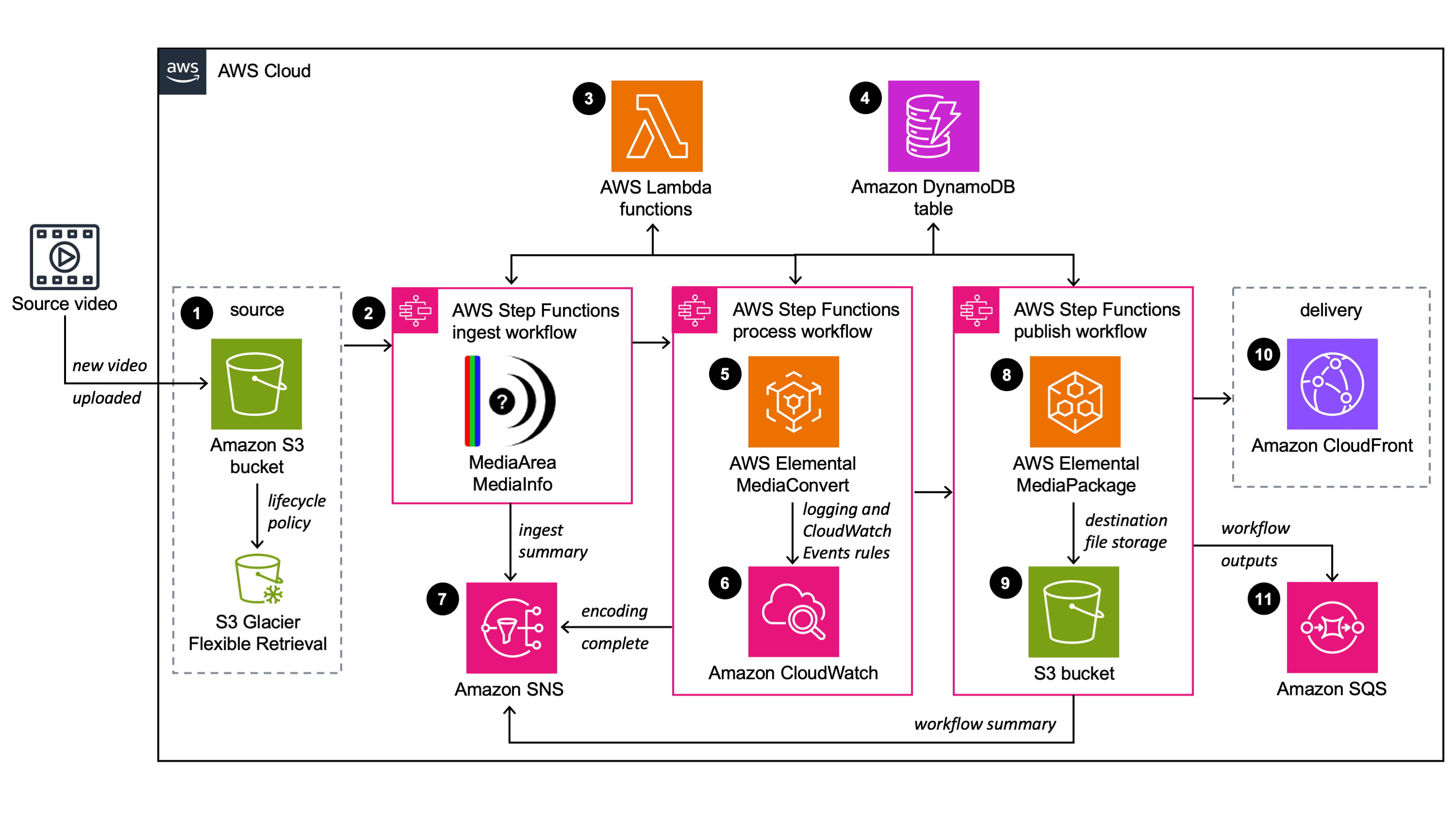
Delivering high-quality on-demand video at scale is both a technical and operational challenge. This project — a Terraform-backed AWS Video-on-Demand (VoD) pipeline — demonstrates a pragmatic serverless architecture that balances cost, performance, and manageability. Below I walk through the key design choices, how components interact, and why this approach works well for many media workloads.
Overview
The solution is organized into three workflow stages: Ingest, Process, and Publish. Each stage is implemented with a small set of Lambda functions and wired together by Step Functions. S3 is used for source and output storage; MediaConvert performs encoding; MediaPackage handles packaging for adaptive streaming. A single DynamoDB table tracks workflow state for each video (keyed by a GUID). The IaC is written in Terraform and split into modules for storage, compute, orchestration, messaging and custom resources.
Why this pattern?
Modern VoD pipelines must do three things reliably: (1) accept and validate source assets, (2) transcode and produce multiple adaptive bitrates, and (3) package and publish outputs for clients. Serverless pieces (Lambda + Step Functions) let you represent each logical task as an independently versioned function, which simplifies testing, rollback and incremental improvements. MediaConvert is a managed encoder with native integration to other AWS media services and handles many of the complex codec details for you.
Ingest: catching the right event and normalizing input

The workflow starts when an object is uploaded to the source S3 bucket. The Step Functions trigger Lambda step-functions which determines whether the event came from a video file or a metadata JSON file. This repo supports two modes:
Video-triggered — upload a video and the ingest pipeline starts automatically
Metadata-triggered — upload a JSON file referencing a pre-uploaded video for per-video overrides (custom template, frame-capture, archiving, etc.)
This dual-mode is practical for operations teams that want manual control (metadata overlay) and for automated ingestion (S3-triggered). The input-validate Lambda standardizes variables and sets sensible defaults via environment variables defined by Terraform.
Process: profile, select template, and encode

The mediainfo Lambda extracts technical metadata (frame size, codecs, duration) and stores it on the workflow object. profiler chooses the best output template. Key design choice: the profiler avoids upscaling — it selects the highest template that does not exceed the source resolution. This preserves output quality and reduces unnecessary encoding cost.
Encoding is handled by encode, which uses MediaConvert. Notable features in the implementation:
Endpoint discovery: code calls MediaConvert DescribeEndpoints to get account-specific endpoints before submitting jobs
Template fallback: if a named job template is missing, the encode function tries
_fixedvariants and alternate template families (mvod vs qvbr) before failing, improving robustnessOutput destination mapping: output groups are copied from the template and their S3 destination paths are adapted per-job (hls/, dash/, cmaf/ folders)
Frame capture (thumbnail generation) can be enabled per-job and writes to a thumbnails/ folder
This produces CMAF/HLS/DASH output sets suitable for broad device compatibility. Using a single universal CMAF template simplifies operations while QVBR provides quality/cost trade-offs tuned per-resolution.
Publish: validate, archive and package

Once MediaConvert completes, the output-validate Lambda verifies the output files and records the result in DynamoDB. If enabled, archive-source tags the original file for lifecycle transition to Glacier (or Deep Archive). When MediaPackage is enabled, media-package-assets ingests the job outputs into MediaPackage VOD and sets up packaging groups (HLS/DASH/CMAF), returning playback endpoints that can be distributed through CloudFront.
Operational considerations
State tracking: A single DynamoDB table keyed by guid stores the lifecycle for each video, metadata and timestamps. This simplifies querying, retries, and postmortem audits.
Error handling: The repo includes an error-handler Lambda used by other functions; it can update DynamoDB, publish SNS messages and centralize retry or alerting logic.
Security and least privilege
IAM roles are scoped for each Lambda with the minimal actions they require: S3 Get/Put, DynamoDB Update, MediaConvert CreateJob/GetJobTemplate, and MediaPackage ingest. Terraform modules consistently apply solution tags (SolutionId = SO0021) and default resource naming patterns to make policy scoping and cost allocation straightforward.
Deployment and infrastructure
This implementation uses Terraform >= 1.5 and modularized configuration in IaC/modules/. Lambda code lives in IaC/lambda_functions/; the Terraform archive_file data sources build ZIP archives from those folders so deploys can be done with terraform apply directly from the cloned repository (after dependencies are installed).
PowerShell helper scripts in IaC/ create MediaConvert templates and MediaPackage resources as needed. The workflow trigger (VideoFile vs MetadataFile) is a deployment-time choice and controls how S3 notifications are wired.
Key operational knobs
Accelerated transcoding: options ENABLED, PREFERRED, DISABLED — PREFERRED is a nice cost/latency balance
Frame capture: enables thumbnail output during the encode job
Archive policy: integrates with lifecycle to Glacier/Deep Archive for long-term retention and cost savings
Testing and observability
Lambda functions log structured events to CloudWatch. Step Functions give a visual trace for each workflow execution. Metrics (job counts, failures, encoding time) and CloudWatch alarms should be added for production readiness. The project already supports SNS/SQS for downstream notifications which can feed CI or monitoring pipelines.
Business benefits
This architecture abstracts the complexity of encoding and packaging behind a reproducible, IaC-managed pipeline. It reduces operational overhead by using managed services (MediaConvert, MediaPackage) while giving engineering teams deterministic control over the workflow via small Lambda components. Cost controls like QVBR, archiving, and optional accelerated transcoding allow you to tune spend against SLA needs.
Next steps and improvements
CI/CD: add a GitHub Actions pipeline to run Terraform plan/apply with environment-specific backend configs
Unit/integration tests: provide unit tests for Lambdas and integration tests that submit a small job to a sandbox account
Monitoring: add CloudWatch dashboards, metrics, and alerting for failed jobs or encoding backlogs
Security hardening: optional VPC-enabled Lambdas and tighter IAM resource ARNs for MediaPackage/MediaConvert
Conclusion
This repository is a practical, modular starting point for building a scalable VoD pipeline on AWS. The combination of simple Lambdas, careful template selection, and managed media services delivers a reliable, cost-conscious platform suitable for most VOD workloads.
I created a simple frontend to demonstrate how the encoded media works with Automatic Bitrate Ladder (ABR). The player dynamically switches between multiple video resolutions depending on the viewer’s available bandwidth, providing an adaptive streaming experience.
See it in action: https://vod.monvillarin.com
(No copyright infringement intended. For educational purposes only.)
LinkedIn: linkedin.com/in/ramon-villarin
Portfolio Site: MonVillarin.com
Github Project Repo: https://github.com/kurokood/aws-video-on-demand